Context & Objective
This project started as an exploration of AI-assisted development — using tools like Claude and ChatGPT not just to generate snippets, but to drive an entire product from concept to deployment.
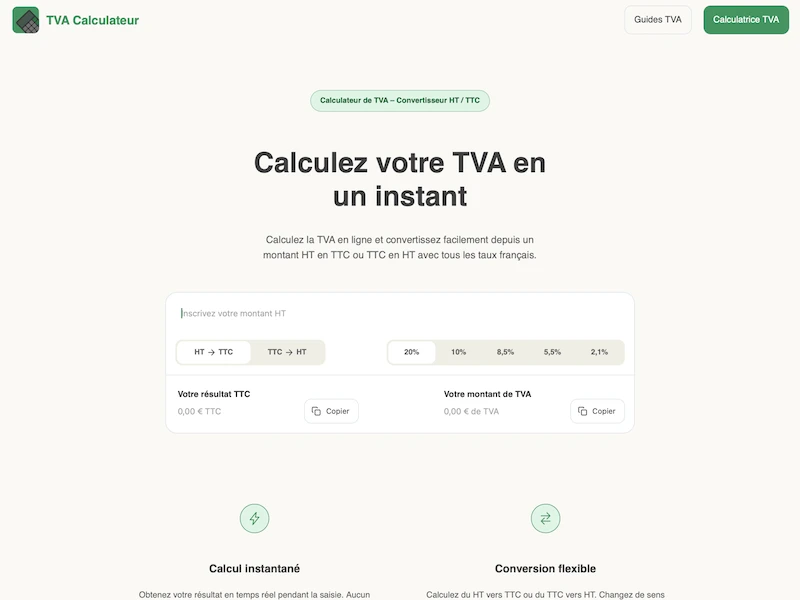
The goal was to build a genuinely useful tool: a VAT calculator tailored to French artisans and self-employed professionals, who regularly need to switch between tax-inclusive and tax-exclusive amounts across multiple VAT rates. The project also served as a content platform, with informational articles covering VAT regulations for specific industries.
Rather than reaching for an off-the-shelf solution, I chose to build a custom static site generator — which forced me to think carefully about architecture, templating, and the full build pipeline from day one.
How the SSG works
The static site generator is a Node.js script (build.js) that compiles source files from src/ into a deployable dist/ folder.
Front matter parsing
Each source file contains a YAML-style front matter block between --- delimiters. The build script extracts metadata (title, description, date, layout type…) and separates it from the page content.
Template includes
Layouts reference shared partials via @include(templateName) comments. The script resolves these recursively — header, footer, and any nested components are assembled into a single output file.
Variable injection
Placeholders like {{TITLE}} or {{ARTICLES_GRID}} are replaced with computed values — metadata fields, formatted dates, reading time, or dynamically generated HTML like the article card grid.
Clean URLs & sitemap
Pages are written as slug/index.html to produce clean URLs without .html extensions. A sitemap.xml is automatically generated from the list of built URLs at the end of each build.
Assets (CSS, JS, fonts, images) and static public files are copied into dist/ as-is. The entire output is ready to deploy directly to Vercel.
Technical stack
Frontend
- HTML & CSS Semantic markup, custom CSS architecture split into base, components, layout and utility layers
- Vanilla JavaScript Calculator logic, accordion, mobile menu, scroll animations — all without dependencies
Build & Deploy
- Node.js (custom SSG) Custom build script handling templating, front matter, article generation and sitemap
-
Vercel
Deployment with custom domain, clean URL routing via
vercel.json
Tooling
- Claude & ChatGPT Used throughout to explore solutions, generate code, review architecture decisions and produce article content
Challenges & Learnings
Driving a project with a limited knowledge base
The main challenge was making architectural decisions without the experience to evaluate them properly. Should articles live in Markdown or HTML? How should templates be structured? I had to use AI tools not just to write code, but to understand the tradeoffs between different approaches — learning to ask the right questions became as important as writing the code itself.
Understanding the terminal and the build process
Running Node.js scripts, managing package.json, understanding what a build step actually does — these were all new. Debugging build errors in the terminal was frustrating at first but ended up being one of the most practical things I learned.
Designing a CSS architecture from scratch
Rather than using a utility-first framework, I built a layered CSS structure (base, components, layout, utilities) — which forced me to think about naming, specificity, and how styles cascade across a real project. This gave me a much deeper understanding of CSS than writing styles file by file ever would have.
Thinking about the product before writing code
Starting from a concrete user need — French artisans calculating VAT — shaped every decision: which rates to include, how the calculator should behave, what content would be genuinely useful alongside it. That product-first mindset was a deliberate constraint, and it changed how I approached the project.